Streamlined parking experience with 5 key design innovations to reduce user stress by 60%.
Park
Away
- Role:
- Research, UI/UX Design, Interaction Design
- Team:
- 4 UI/UX designers
- Tools:
- Figma, FigJam
- Duration:
- 4 Months

Project Overview
Problem
Finding parking in busy areas can be frustrating, drivers waste time circling for spots, struggle with confusing zone numbers, and face unexpected fines due to app errors or unclear rules.
Goal
To identify pain points in current parking apps usage and design intuitive, user-centered features that reduce friction, save time, and build trust.
Outcomes
- 30%
estimated increase in engagement with pre-booking functionality.
- 40%
predicted reduction in time spent searching for parking spots.
- 50%
expected increase in successful first-attempt bookings.
- 60%
projected decrease in user-reported payment errors.
User Research
We conducted qualitative research through contextual inquiries and interviews to observe how users interact with parking apps like ParkMobile and Passport Parking, uncovering key usability gaps and frustrations.

1. Contextual Inquiry
- Participants were observed in real-world settings while using a parking app to complete real-world tasks.
- They were asked to think aloud, allowing us to gather spontaneous reactions, challenges, and decision-making insights.
2. Follow-up Interviews
- We conducted follow-up interviews to explore users’ past experiences, challenges, and expectations with parking apps.
- We also observed how environmental factors like multitasking, noise, and on-the-go navigation influenced user interaction with the app.
Participants
We engaged 8 participants between the ages of 20 and 26, all regular or occasional users of mobile parking apps. The participant group included:
- University students commuting to the RIT campus
- Event attendees parking in crowded city areas
- Drivers using ParkMobile and Passport Parking in varied contexts (campuses, downtown, events)


Research Synthesis
To make sense of our observations, we created several interpretive models. These models helped us visualize user workflows, emotional responses, and systemic breakdowns across the parking journey.
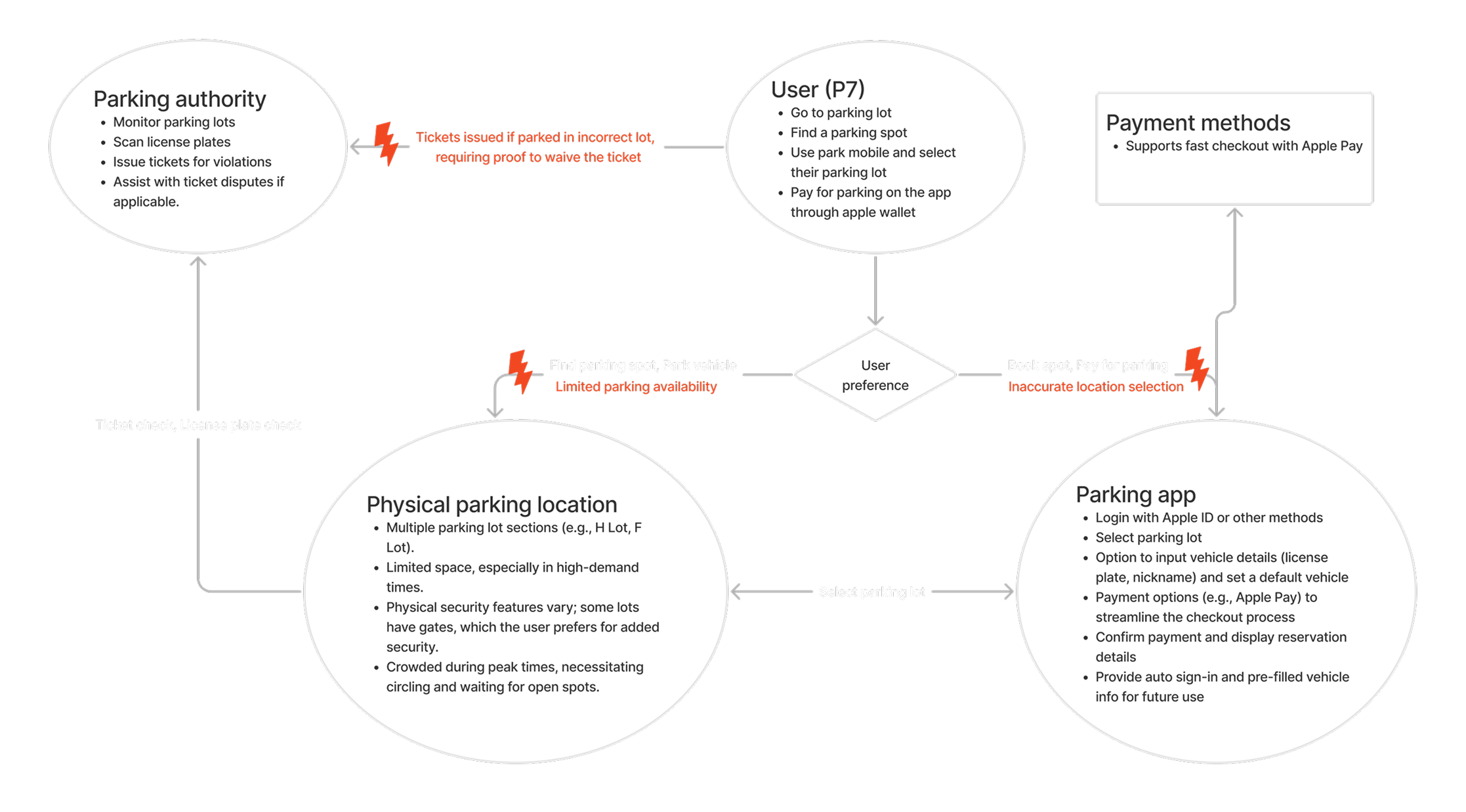
Flow Model
We mapped how users interact with parking apps from arrival to payment. It revealed handoffs between people and systems, waiting for the blue zone numbers, and highlighted moments of confusion and delay in the overall parking flow.
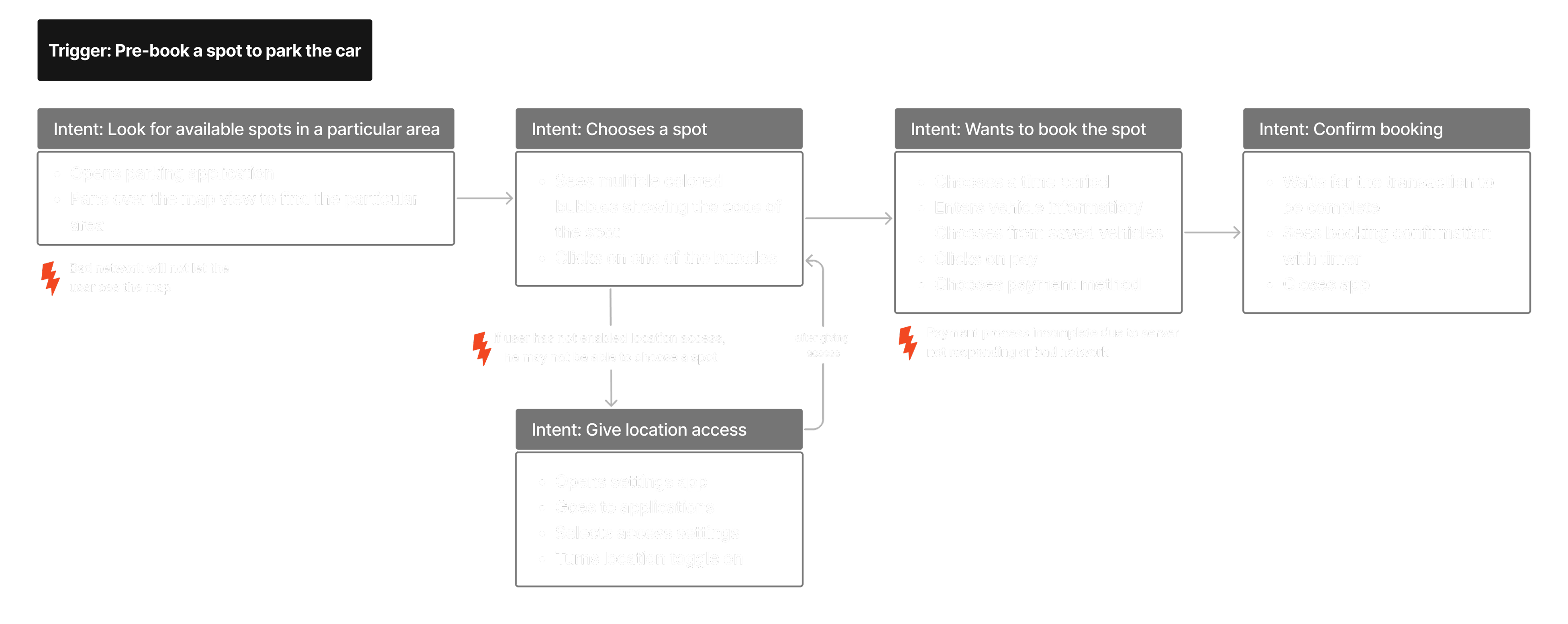
Sequence Model
We broke down each step users took while finding and booking parking. It exposed key pain points such as starting the parking timer before confirming payment and long steps for zone selection, which caused stress and errors.
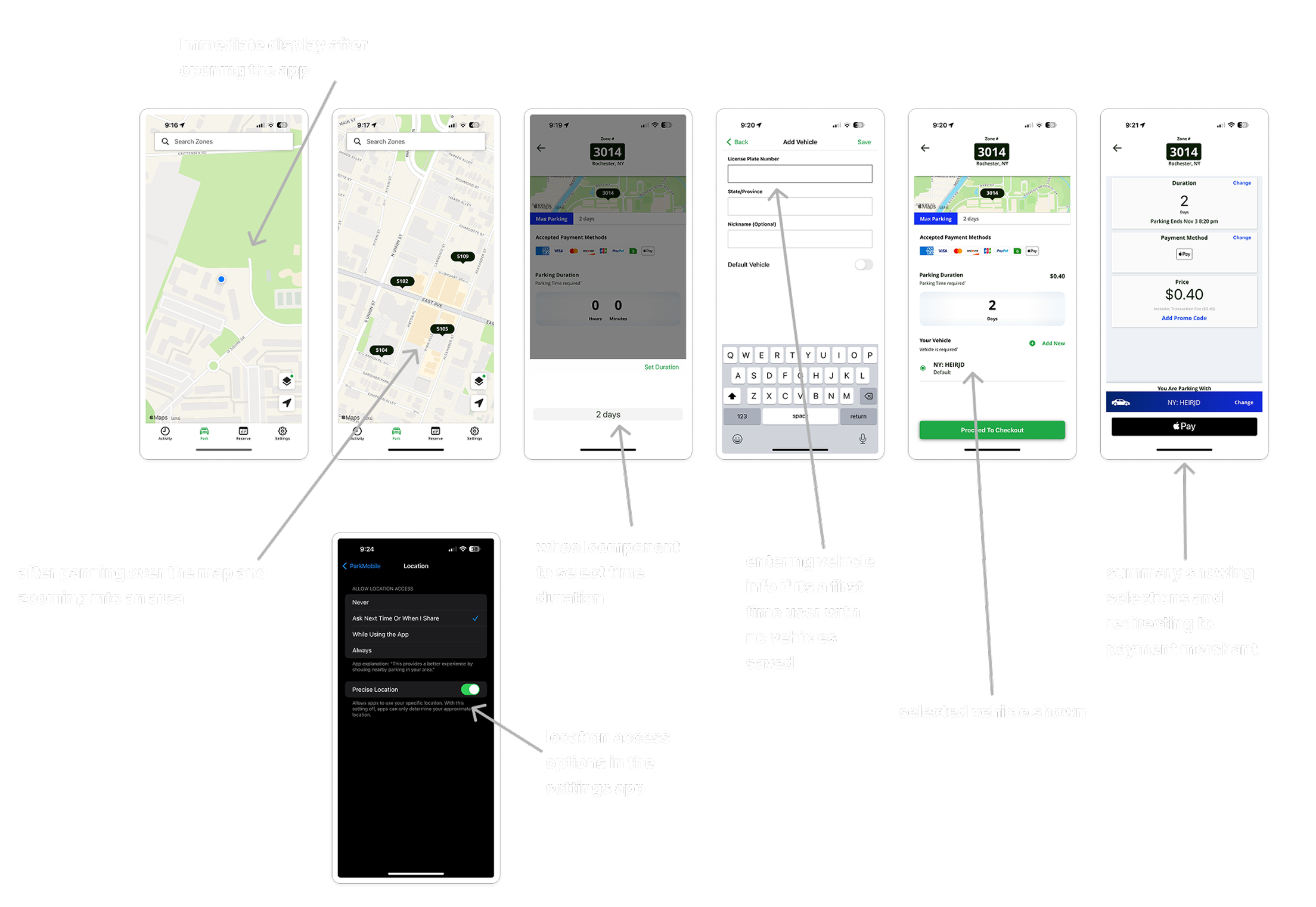
Artefact Model
It showes user reliance on their smartphones as the main tool for parking, especially for payment and navigation. It also revealed a gap between the app and the physical world, such as unclear signage and missing real-time info.
Cultural Model
It helped us Explore user beliefs and motivations, uncovering trust issues with pre-booking, reluctance to share precise location, and a strong preference for safety features like gated lots and surveillance indicators.
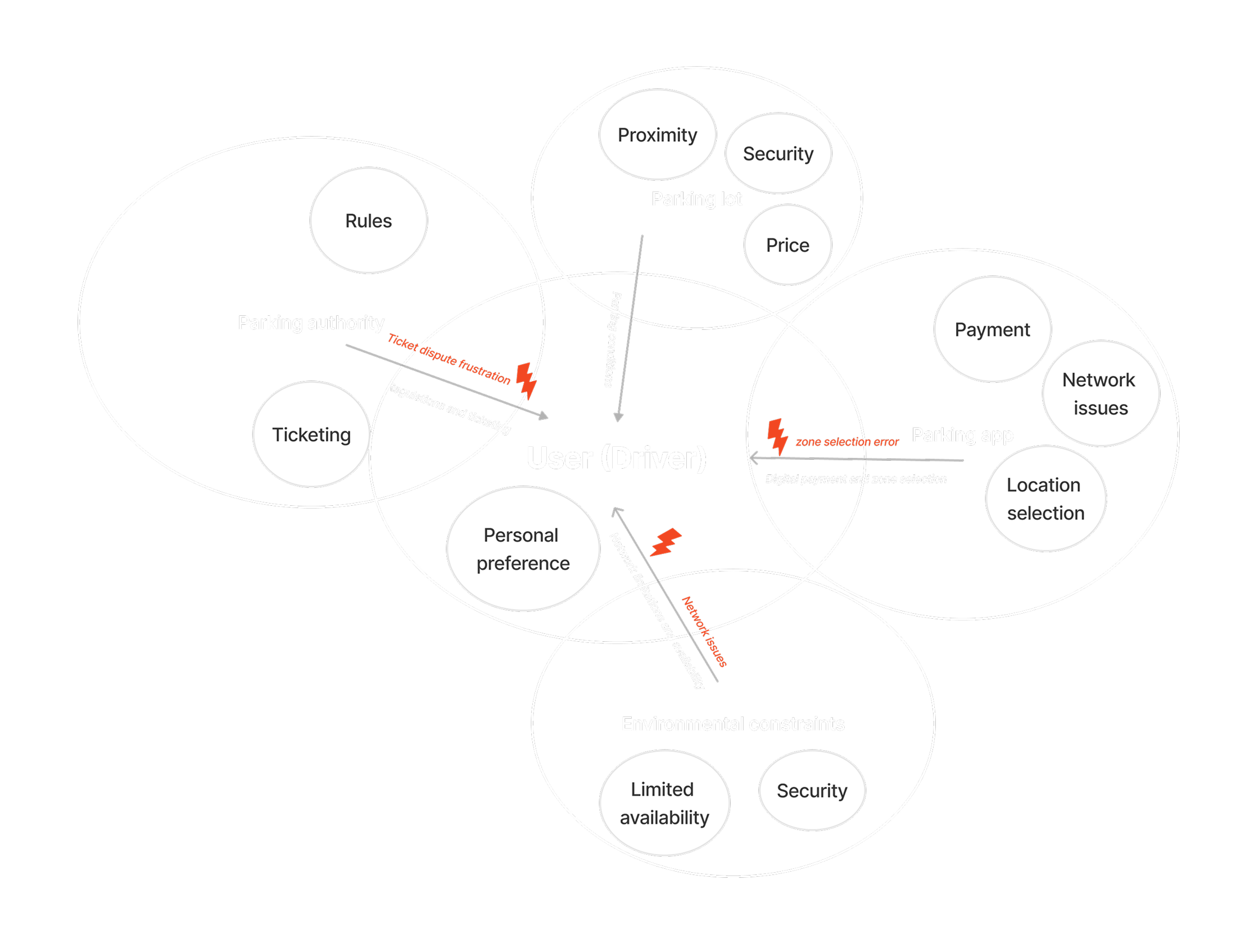
Research Insights
Through user interviews and contextual observations, we uncovered key pain points
No Real-Time Availability

75% of Users of users had to physically drive around to check for open spots due to lack of real-time updates.
Confusing Zone Selection
62% of Users experienced confusion selecting zones before payment confirmation.
Trust in Pre-Booking
50% of Users expressed low confidence that a pre-booked spot would still be available on arrival.
Notification Visibility
88% of Users wanted clearer timers/alerts for session start, expiry, and extensions.
Price Transparency
75% of Users were unsure about final price until late in the flow.
Location Permissions
62% of Users hesitated to share precise location when pre-booking.
User Personas
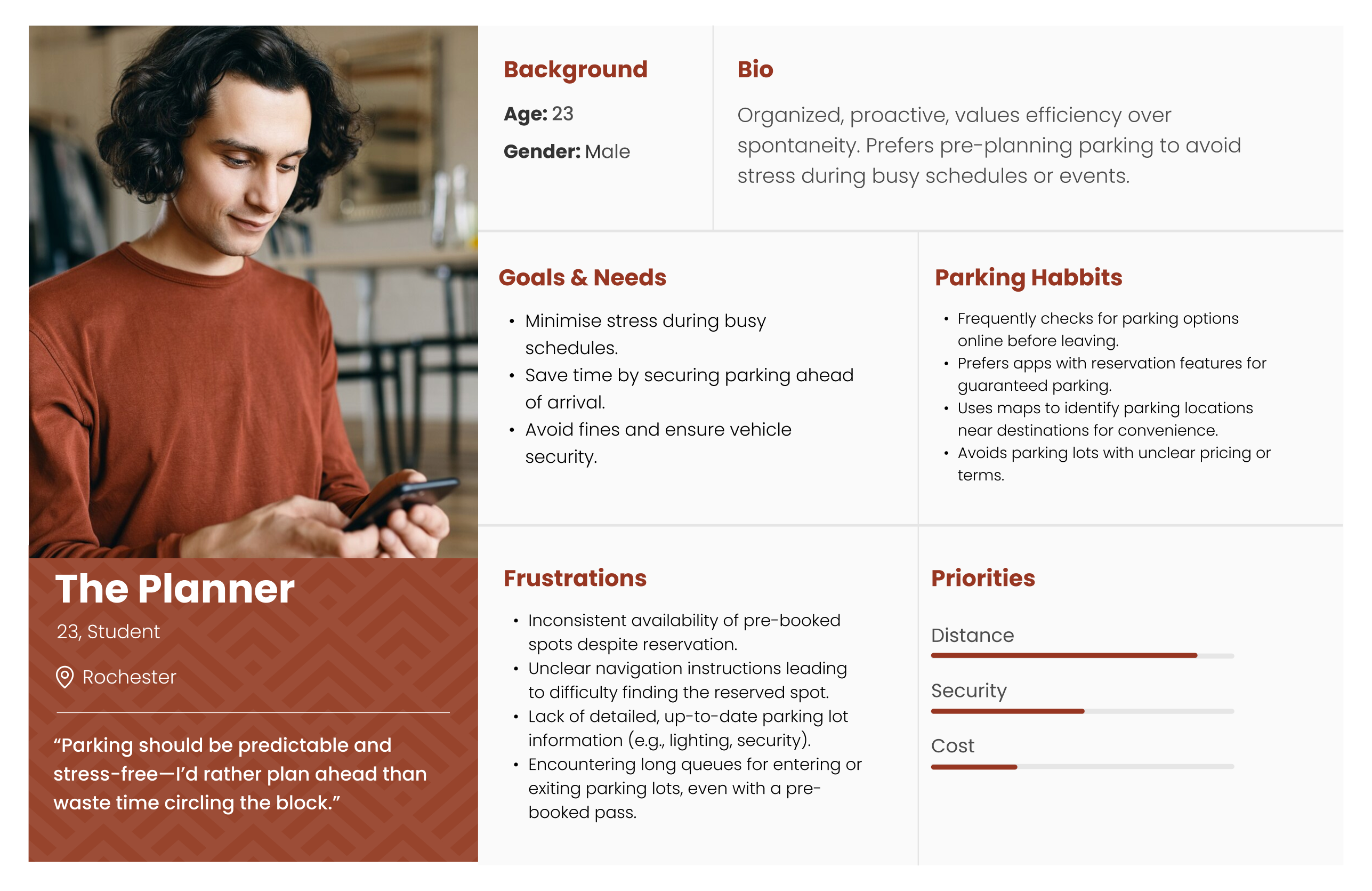
The Planner is an individual who values organization and preparation, ensuring that every detail is accounted for. They prefer to avoid last-minute stress by planning ahead and often pre-book parking to save time and ensure convenience during busy schedules or events.
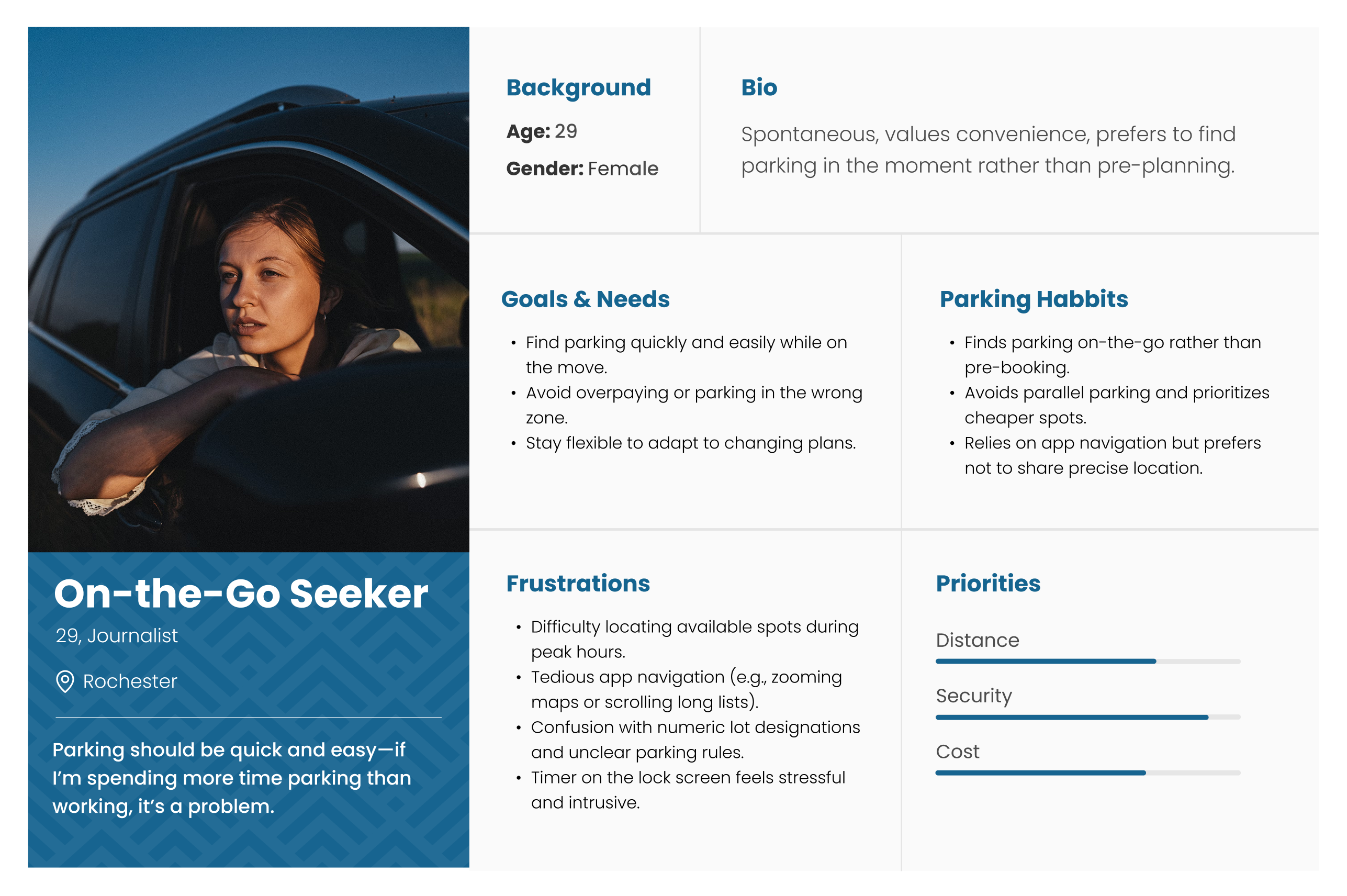
The On-the-Go Seeker values flexibility and convenience, using parking apps to find spots in real time. They prefer simple, intuitive navigation and adaptable solutions that fit their changing plans, seeing parking as a quick, functional part of their journey.
Story boards
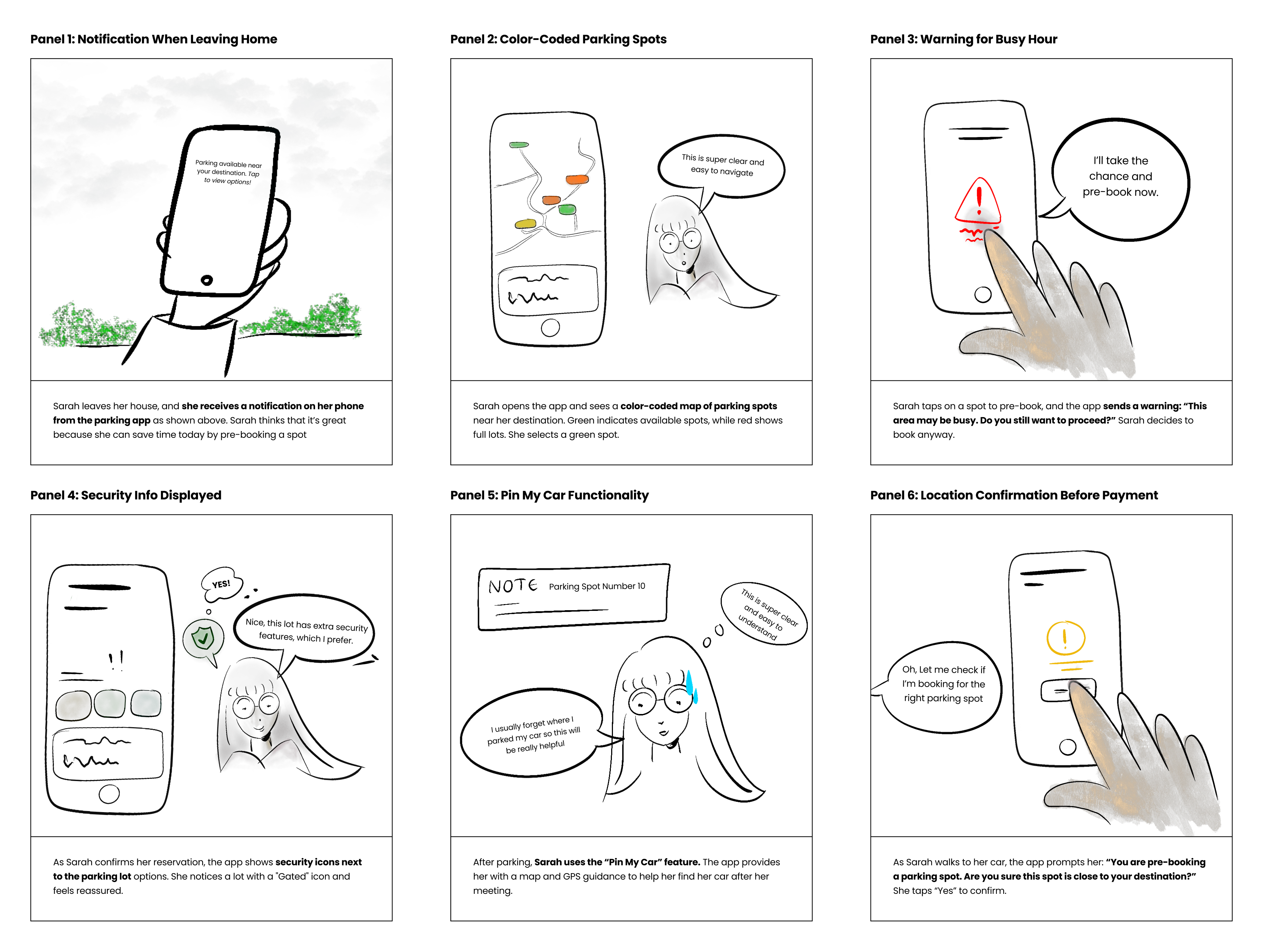
Ideating Features
Based on insights from our personas and their everyday challenges, goals and needs, we proposed 5 key features:
Colour-coded Availability
Simple feature that lets roommates express how they feel each day, helping others understand their mood, avoid tension, and build empathy without needing long conversations.
Wallet System
A way to share important updates like guests, repairs, or house plans in one place, helping everyone stay informed and on the same page.
Pre-Booking
A shared system that makes it easy to divide responsibilities, set due dates, and track recurring chores, ensuring everyone contributes fairly and stays organized.
Location Confirmation
An expense tracker that simplifies logging purchases, splitting costs, and viewing balances, making money matters clear and avoiding awkward conversations.
Feedback Mechanism
A collaborative grocery list allows roommates to add and track items in one place, making shopping more efficient and avoiding duplicate purchases or forgotten essentials.
Design System
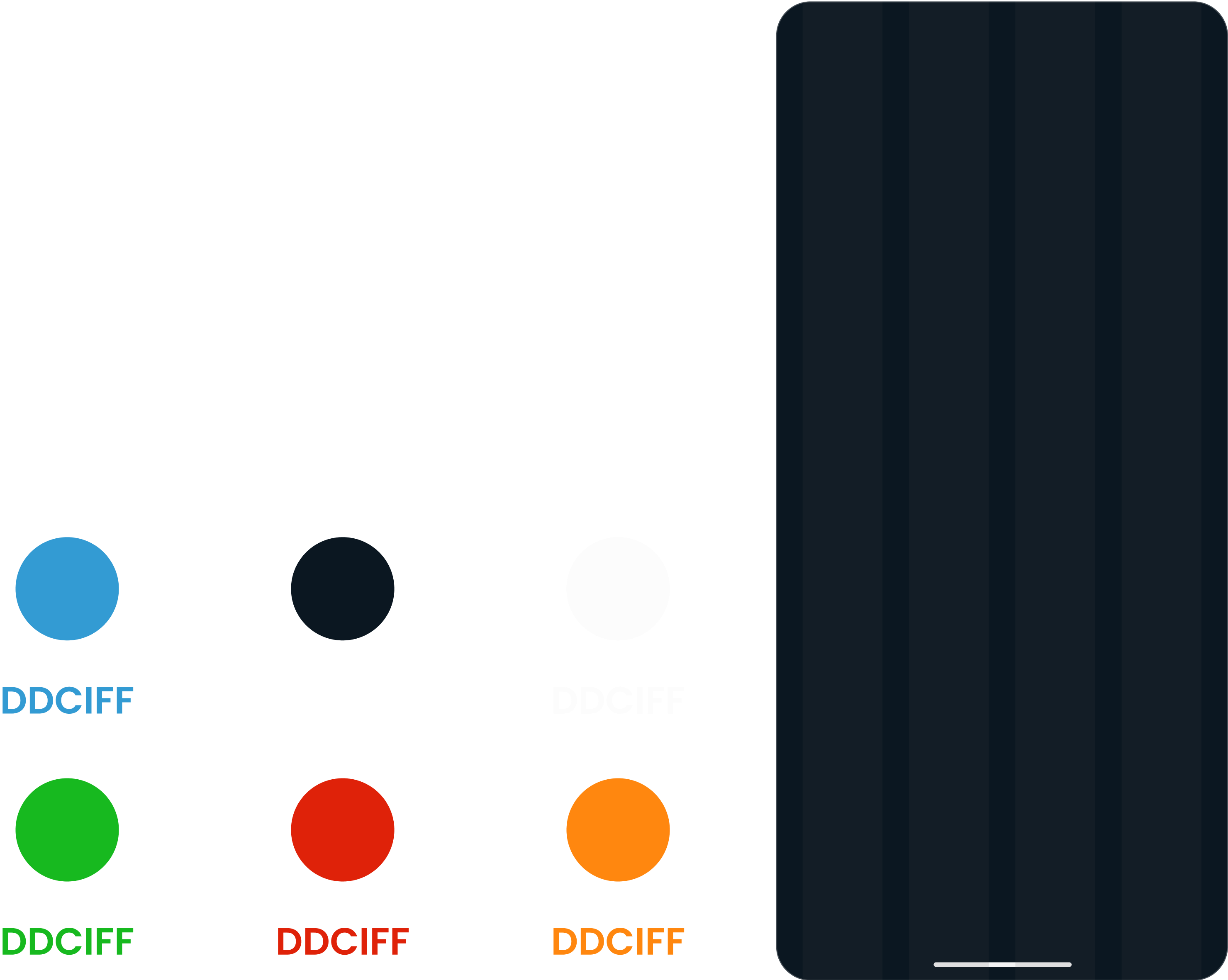
We created a lightweight design system with reusable components, consistent typography, and colour pallet to keep the app cohesive and speed up iterations.
Typography and Color
Design Solutions
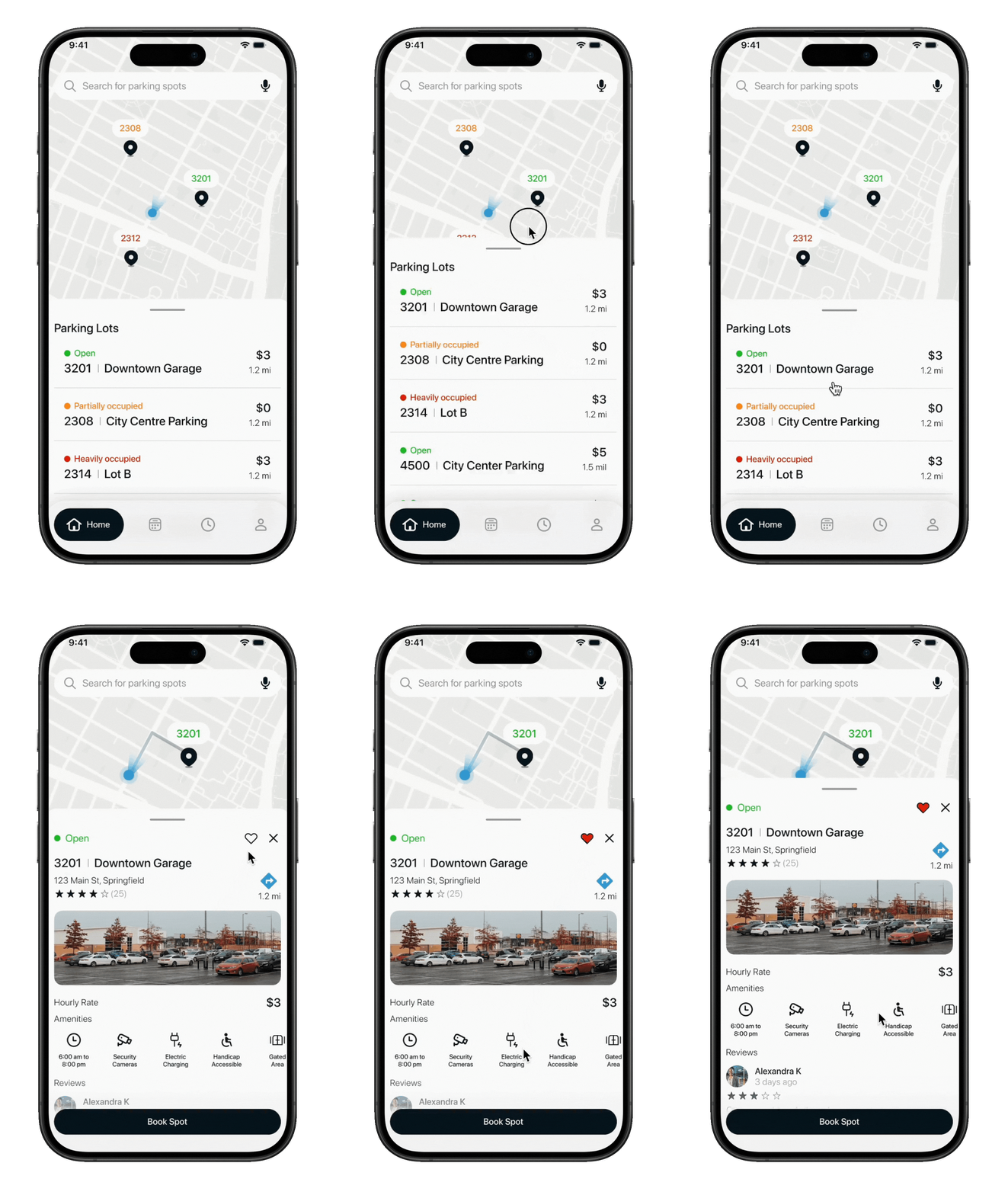
Color-Coded Availability: See spot availability at a glance.
Users often struggled with uncertainty around open spots. Color-coded indicators show real-time and predicted availability, even during pre-booking, helping drivers make faster and more confident choices.
Pain Points Targeted: No Real-Time Availability, Trust in Pre-Booking
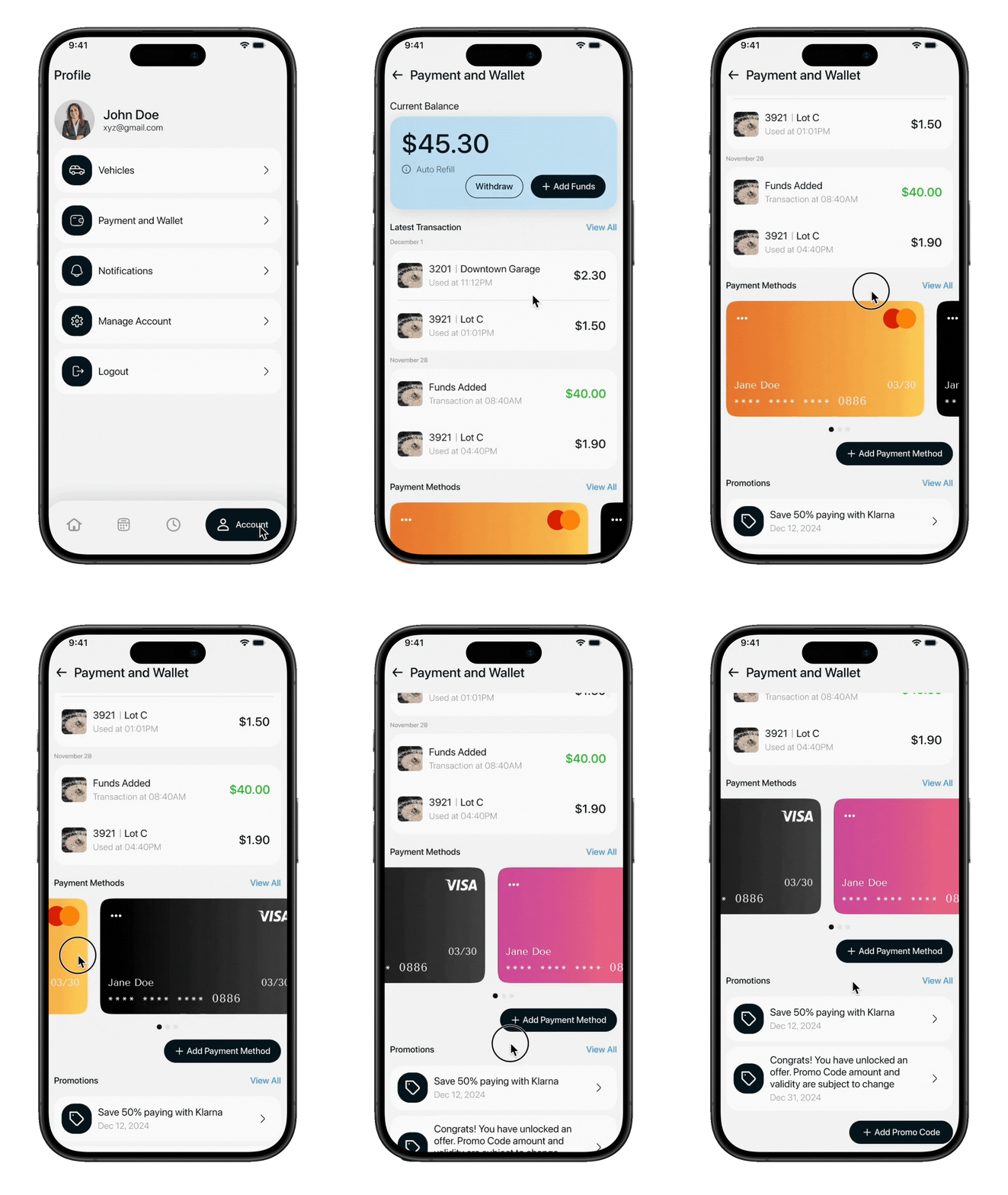
Wallet System: Add funds once, pay seamlessly every time.
Managing multiple payment steps created friction and drop-offs. With the wallet system, users can preload balance and complete transactions in seconds, reducing errors and streamlining the parking experience.
Pain Points Targeted: Confusing Zone Selection, Inconvenience in Payments
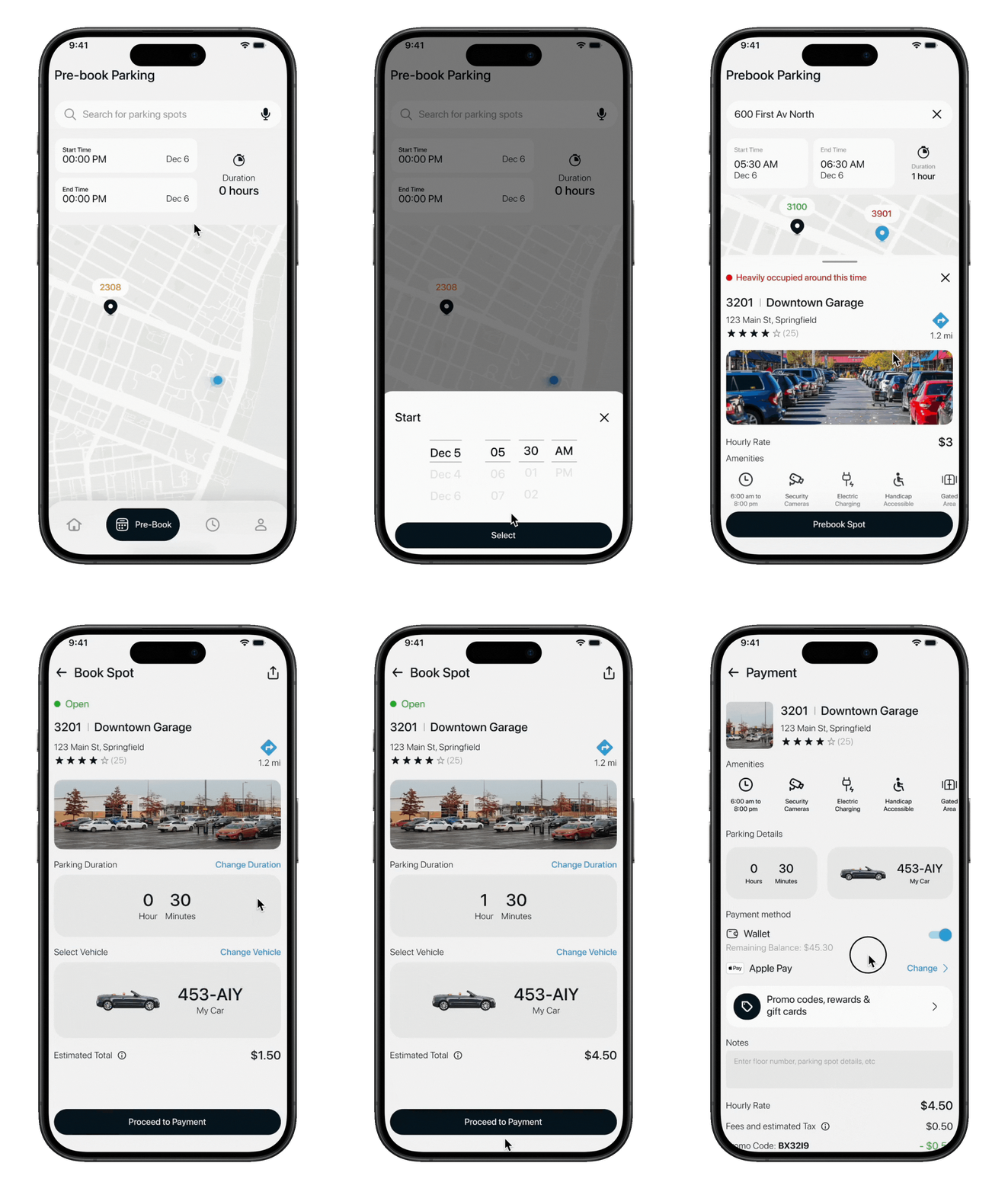
Smarter Pre-Booking: Check predicted spot availability before committing.
Half of users expressed low trust in pre-booked spots. The pre-booking flow now displays potential availability based on the selected time, with confidence indicators that set clear expectations and build reliability.
Pain Points Targeted: Trust in Pre-Booking
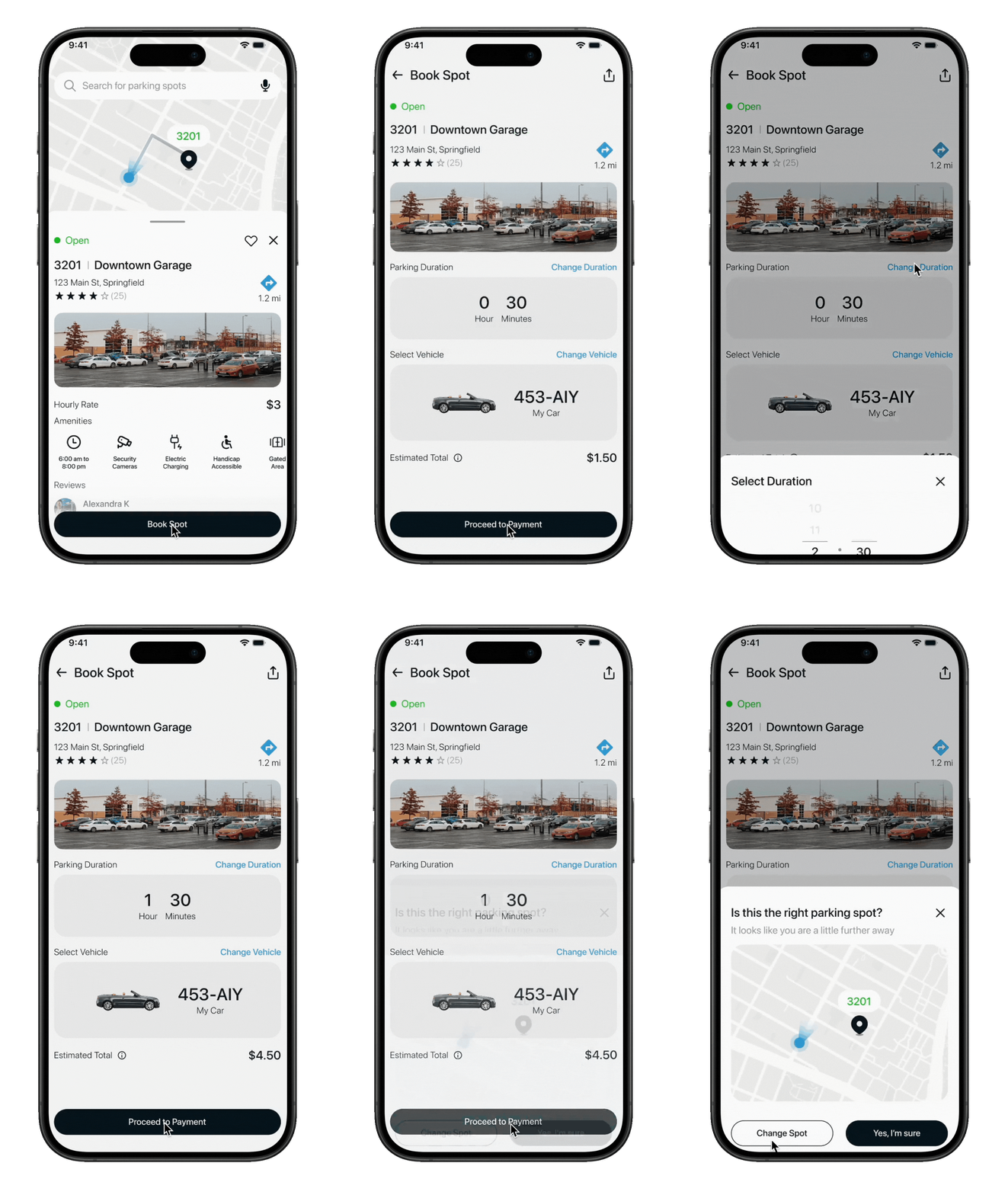
Location Confirmation: Avoid mistakes with a simple confirmation pop-up.
Users sometimes paid for the wrong parking lot, causing confusion and unexpected charges. To prevent this, ParkAway adds a confirmation step before payment, ensuring drivers always verify the correct location before booking.
Pain Points Targeted: Location Permissions, Confusing Zone Selection
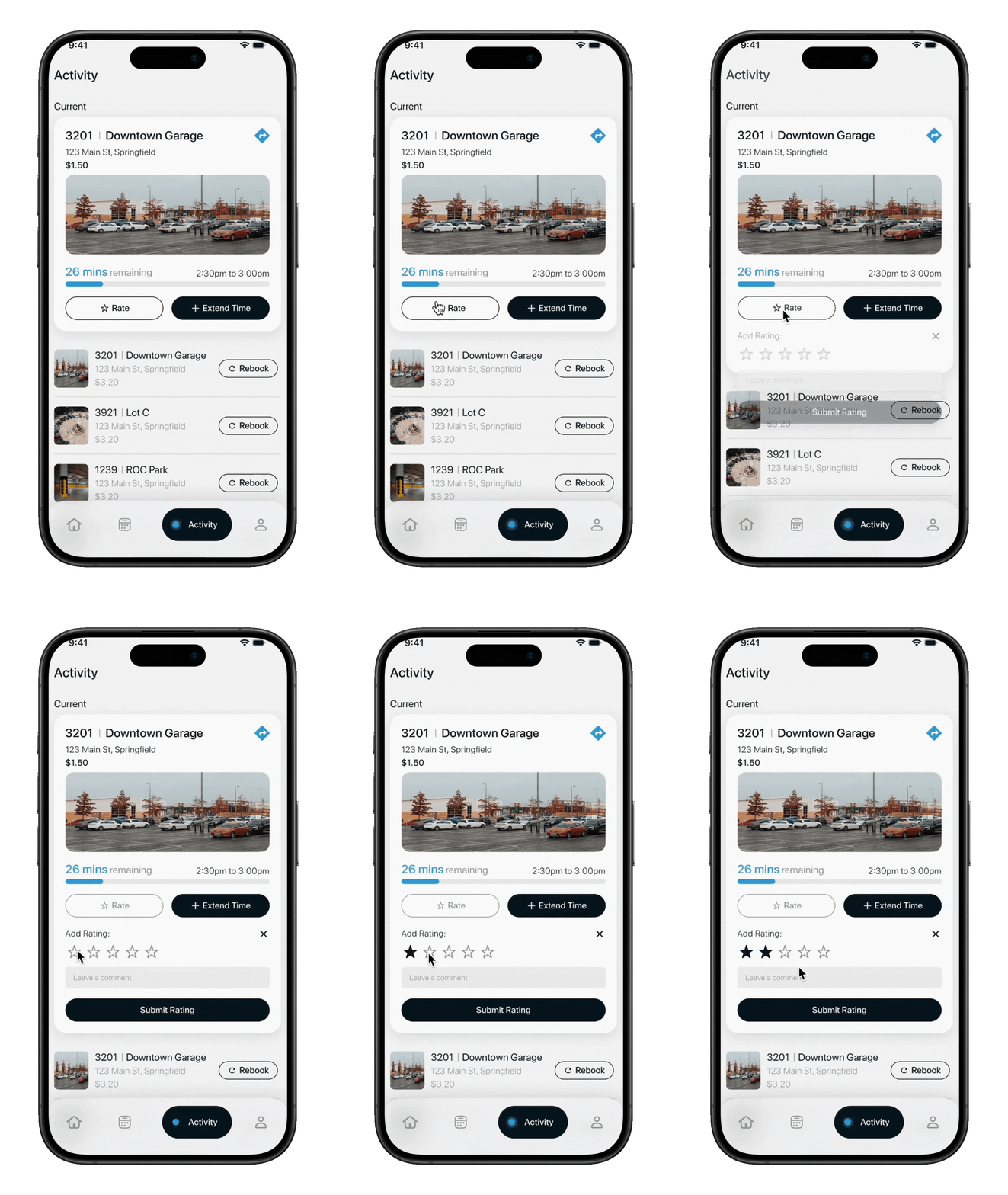
Feedback Mechanism: Close the loop by rating and reporting after your session.
Users often felt their concerns about parking accuracy or safety went unheard. The in-app feedback system lets them rate experiences and flag issues, helping improve reliability and trust over time.
Pain Points Targeted: Trust in Pre-Booking, Notification Visibility
Outcomes
- 30%
estimated increase in engagement with pre-booking functionality.
- 40%
predicted reduction in time spent searching for parking spots.
- 50%
expected increase in successful first-attempt bookings.
- 60%
projected decrease in user-reported payment errors.
Future Goals
Loyalty & Rewards
Introduce a points-based system for frequent users, offering discounts or priority access to high-demand parking areas.
Personalized Dashboard
Allow users to view their parking history, savings, and preferred locations for quicker, smarter future bookings.
Accessibility Expansion
Improve support for drivers with accessibility needs by highlighting ADA-compliant spots and offering step-free navigation guidance.
Learnings
Small Details Matter
Micro-interactions like clear confirmation states or color-coded confidence levels, played a key role in improving overall user confidence.
Trust Is Central
Users value transparency, showing accurate availability and pricing proved more important than visual polish alone.